Oracle
Secure Enterprise Search is a product integrated with PeopleSoft
uses PeopleSoft Search Framework to integrate and communicate with PeopleSoft. PeopleSoft
Application Version 9.2 onwards, configuring the PeopleSoft Search Framework
and Oracle SES is required as Verity is no longer supported from PeopleSoft
application versions 9.2.
Prerequisites - Configure Loopback Adaptor & Disable IPv6:
To check if the Microsoft
Loopback Adapter is installed on your computer: Open a command window and
enter - ipconfig /all
If the loopback adapter is installed, its
settings are displayed as below.
Ethernet adapter Local Area Connection 2:
Connection-specific DNS Suffix . :
Description . . . . . . . . . . . : Microsoft Loopback Adapter
Physical Address. . . . . . . . . : 02-00-4C-4F-4F-50
Dhcp Enabled. . . . . . . . . . . : No
IP Address. . . . . . . . . . . . : 192.168.123.123
Subnet Mask . . . . . . . . . . . : 255.255.255.0
Default Gateway . . . . . . . . . :
By default, the IPv6 protocol is enabled on Windows Server 2008.
Under some circumstances, this may lead to the failure in starting up the
WebLogic Server middle tier. Hence it is suggested to disable certain IPv6
components, except the IPv6 loopback interface, on Windows Server 2008.
SES Installation:
Right-click setup.exe in the ses_11_1_2_2_0_windows64
folder of the extracted files, and then click Run as
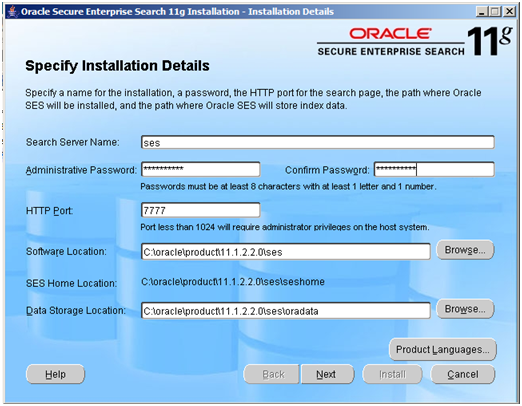
administrator. The Installation Details page appears as below.
Enter a Search Server Name, Password,
Port (Default port: 7777), Administrative password (Password needs to be
8 char with 1 letter and 1 number, and no special chars)
The installer will now install Web
logic Server as the web server hosting SES and Oracle Database 11g EE to store
the search indexes. After the installer finishes you will
be presented with the summary screen containing three URL’s.
- SES end user search page (the one that looks like
Google)
- SES admin console
- Web logic admin console
At the completion of the install
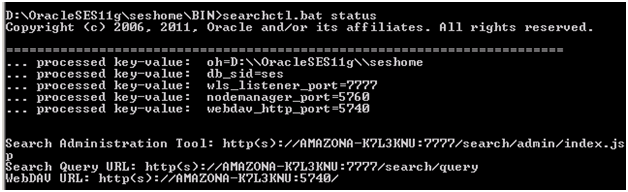
you get a window that displays some URL’s copy them off to keep.To get URL àIn cmd window, navigate to
SES_HOME, give ‘searchctl.bat status’ command.
SES Configuration
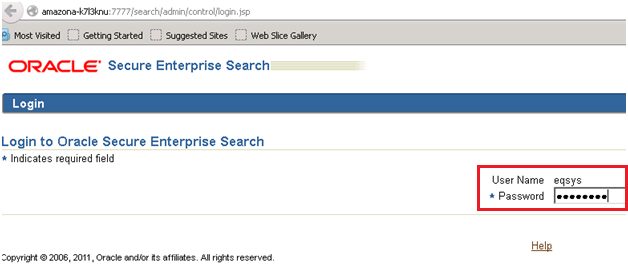
Username: eqsys (default) Password: < Administrative password>
Choose tab Global Settings and then
click on Federation Trusted Entities.
This Entity
Name and password are
configured for inbound connections to SES and will be configured on the
PeopleSoft side.
Enter an Entity name and provide a
password. This does not need to be the password you supplied during
installation of SES, but note this password; you will need to supply it in
PeopleSoft later on.
The Identity
Plug-in and Authentication Attribute
options are left blank for this configuration.
Click Add and go back on the Global
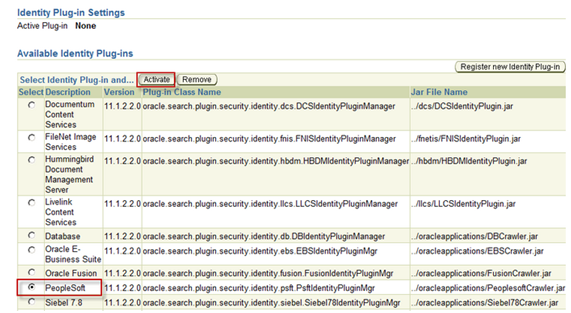
Settings tab, choose the link Identity Management Setup.
Select Plug-in PeopleSoft from the
list and click on the Activate button.
The plug-in that you activate is
responsible for all authentication and validation activity in Oracle SES.
On the next screen enter the
PeopleSoft Integration Broker endpoint and userid and password of the default
local node.
The User
ID and Password here is
a PeopleSoft user that has the ‘Search Framework Administrator’ role or
permissions lists assigned.
Click Finish and go back to the
Global Setting tab choose the link Query Configuration.
Change the timeout settings as
shown above from the default values.
Add AUTO_CHARSET_DETECTION
to $ORACLE_HOME/search/data/config/crawler.dat
to enable Character set auto detection. This is important to properly
handle Unicode files and pages that may be indexed. So I added the
following lines to the end of the crawler.dat
file
# enable automatic character
set detection
AUTO_CHARSET_DETECTION
IB setup for Search Framework
- You need to have setup your Integration Gateway
and load the connectors
- You should define your Gateway Default App Server
and PeopleSoft Nodes in the Gateway Setup properties.
- On the Advanced Properties Page for the Gateway
Setup you should define a secureFileKeystorePasswd
- You Local Node should be active and when if you
ping it, it should come back with Success
- PUBSUB processes should be running on your application
server domain
- Verify that your Service Configuration is correct.
- Navigate to PeopleTools -> Integration
Broker -> Configuration -> Service Configuration
- Click Setup Target Locations
- Confirm the Web Services Target
Location references the correct URL for your system.
7. Configure Content RI and Portal URI text
specified on the portal tab for the default Local Node you
are working with.
This is required,
and you may get an error building your search index without it.
You should also
verify that the Service Operations needed for SES integration exist in your
system. ADMINSERVICE and ORACLESEARCHSERVICE should both
exist as Services.
Setting up PeopleSoft for Integration with SES
First thing you need to do, is to
assign the Search Framework roles (Search Administrator, Search Developer, Search
Server) to the user that is assigned to the default locale node.
Verify
that required permission lists (PTPT3100, PTPT3200, and PTPT3300) are present
on role PeopleSoft User.
Now navigate to Main menu –>
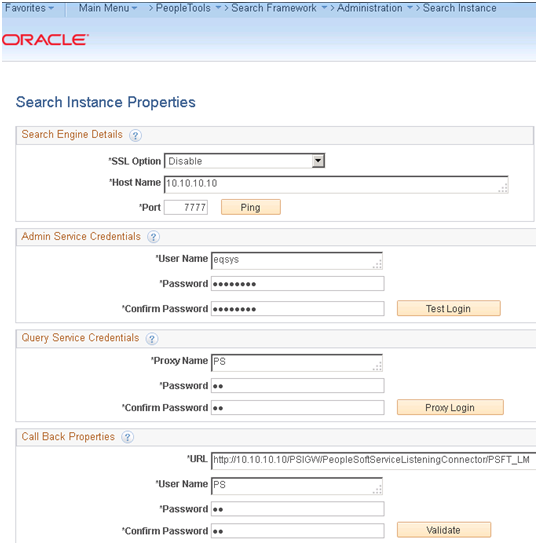
PeopleTools –> Search FrameWork –> Administration –> Search Instance
and create a Search Instance.
- Enter the SES server and port
- Enter the SES admin password you supplied during
installation of SES (eqsys/welcome1)
- Enter the Federation Trusted Entity and the password
you created earlier in SES (PS/PS)
- Enter the call back URL (endpoint of Integration
Broker) and the userid and password of the default locale node
Verifying
PeopleSoft and SES Connectivity
Now navigate to Main menu –> PeopleTools –> Search FrameWork
–> Utilities –> Diagnostics
Click Step
1: Ping Test. This should also work if your previous tests
worked. Once the Ping Test comes back it should make Step 2: Deploy an active link. You
should be able to continue through to Step 4: Search and
everything should work.
Create & Deploy Search Indexes
Now you
have successfully completed the installation and configuration of the
integration between SES and PeopleSoft.
You now have to ‘create search
collections in PeopleSoft ‘and ‘feed
these collections to SES’.
PeopleSoft Search Framework uses PSQuery and Connected Query as search
collections.
Some search collections have
already been supplied with the Feature Pack (Eg: HCM 9.1 FP2). If not you will
have to create a Query and create a Search Index with the Query as input and
then choose which Query fields should be indexed as keywords.
Search definitions are created and
maintained in PeopleSoft. Once the definition is deployed, we run
the Application Engine PTSF_GENFEED via the Schedule
Search Index page. This AE will create a special SES feed
in PeopleSoft and schedule the SES crawler to crawl the feed.
Navigate to Main menu –> PeopleTools –> Search FrameWork –> Administration
–> Deploy/Delete Object. Scroll
to the bottom of the list of Search Definitions and select
PTPORTALREGISTRY and click deploy. Once successfully deployed the Deploy Status column will say Deployed. Next we build the index
data (the feed) and tell SES to crawl the data. In order to do this we
run the Schedule Search Index job as previously mentioned.
Navigate to PeopleTools –> Search Framework –> Administration –>
Schedule Search Index. Create a run control for each search index you want
to publish to SES. Select PTPORTALREGISTRY as the search definition and select
Full index for the Indexing type. If you use the lookup it will only
return deployed search definitions. I left Language Option on Base Language as I only have one language
available. Click Run.
You can then schedule this and
check process monitor to verify it completed successfully. This is to keep SES and PeopleSoft in sync. Once
the job is completed, login to SES and go to the Sources tab of the Home
tab. You should see your search source, and then click the schedules tab;
you should see that the index build was schedule for a one time run.
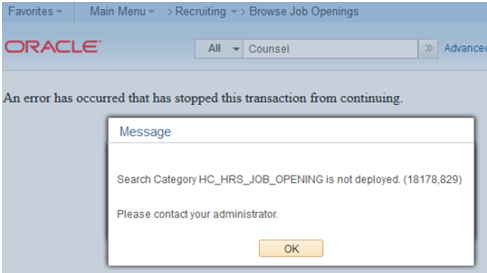
In the 9.2 applications certain
functions won’t work until you’ve deployed the Search Definition and built the
Index. It will throw an error like below screenshot.
Enable Global Search & Keyword Component Search
Now you have seeded SES with PeopleSoft data. You now need to
enable the search feature in PeopleSoft. This can be done on two places.
To enable Global Search navigate to Main menu –> PeopleTools –> Portal –> General Settings and
check Display global search in header. This will enable the embedded
search in the portal banner. Make sure users have search indexes
assigned through permission lists; otherwise they will not be able to run
searches.
This is a new tab in the Permission
lists page in People Tools 8.52.
To enable Keyword search on
Component Search pages, open the search index by navigating to PeopleTools –> Search FrameWork –>
Designer –> Search Definition and on the last tab select the components
where you want to add the Keyword search. This will change your search page
with a new tab enabling Keyword Search.
I have replicated this post @ http://www.citagus.com/citagus/blog/oracle-ses-installation-configuration/